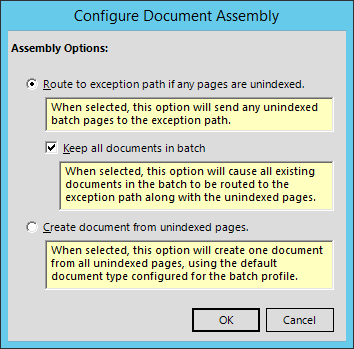
The Quillix Assembly Event may only be used an configured in a Batch Profile process map. To configure the Assembly Event:
Right click on the Assembly Event, the click Configure from the Assembly Event's context menu. The Assembly Event's configuration dialog will be displayed.
Select the desired Assembly Event options and click on OK to save, or Cancel to exit without saving the changes.
Figure 1 - Assembly Event Settings
|
Setting |
Description |
|
Route to Exception Path... |
This setting will cause a case that contains a batch with one or more un-indexed pages to be routed to an exception path. The exception path must be configured after setting this property by linking the Assembly event with another event on the process map. |
|
Keep all documents in batch... |
This setting is used only when the "Route to Exception Path" setting above is checked. Un-checked (default) - When this setting is un-checked, only the un-indexed pages in the batch remain in the case when it is routed to the exception path, and any documents in the case are initiated into their corresponding document-level workflow processes. Checked - When this setting is checked, any documents in the case are kept in the case together with the batch, and the documents are not started into their respective document-level workflow processes at this point. |
|
Create documents from un-indexed pages... |
This setting causes any un-indexed pages remaining in the page to be used to create a new document in the case based on the default document type for the Batch Profile. When this setting is checked, the "Route to Exception Path" setting is not available. |