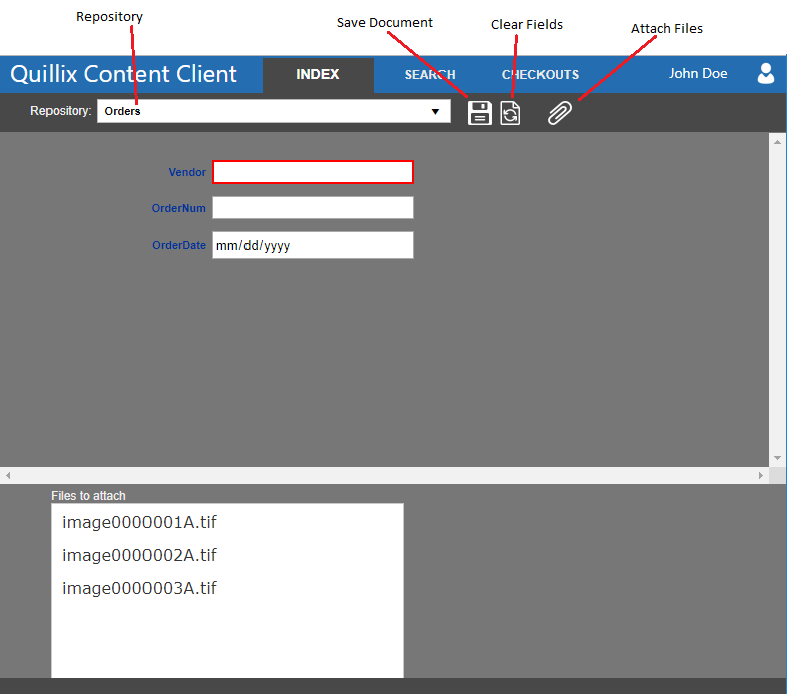
Figure 1 - Index Panel
Using the Index Panel, you can enter field values and select files to attach to a document. Documents are created by selecting a repository from the drop-down list on the Index Panel. The repositories that appear in this list are those for which the current logged-in user has the "Index" right.
The Index Panel always creates a new document - it will not append to an existing document. Use the Attach File button on the result panel to add files to an existing document.
Only Quillix Administrators can create, define, and grant end-users permission to use repositories.
The Index Panel is divided into three sections. A toolbar, an upper section which changes to display the fields for the selected repository and the lower section which shows the names of the files that will be attached to the new document.
Figure 1 - Index Panel
The toolbar has the following tools.
 Save Document button
 Clear Fields button
 Attach Files button
This section shows the repository fields. Date, Time and DateTime fields are displayed with masks that indicate the proper format for each value. Some fields may be required. Required fields have a red border when they do not have a value and must be given a value before a document can be created. Fields with a mask will also have a red border when the mask is incomplete. The mask must be satisfied before a document can be created.
This section shows a listbox with the names of the files to be attached to the new document.